OneBookPlus vs QuickBooks
Australian-first business software
QuickBooks was built for American businesses and retrofitted for Australia. OneBookPlus is built in Melbourne, from the ground up, for Australian small to medium businesses — with GST, ABN, BAS, and ATO compliance baked in.
Key takeaways
5- QuickBooks Online (Australian pricing): Simple Start ~$25/month, Essentials ~$45/month, Plus ~$75/month, Advanced ~$95/month. Localised AU edition handles 10% GST and BAS but uses Intuit's North-American-first feature shape.
- OneBookPlus is built in Melbourne specifically for the Australian market, with native ATO-aligned ABN validation, BAS-ready quarterly summaries, and Single Touch Payroll Phase 2 reporting baked in — not bolted on.
Show 3 moreShow less
- Both handle 10% Australian GST and quarterly BAS-ready reporting; OneBookPlus is in DSPPT-49533 onboarding for direct SBR/PLS lodgement. Check the ATO's Digital Service Provider register for each product's current SBR/PLS status.
- QuickBooks wins on: deep, long-established accounting feature depth, multi-currency, a mature integration ecosystem, and Intuit's bookkeeper marketplace (each detailed and cited in the 'Where QuickBooks wins' section below). OneBookPlus wins on: total cost (replaces QuickBooks + Calendly + HubSpot + Mailchimp in one), AU-first compliance, and a unified customer record across modules.
- OneBookPlus replaces the typical QuickBooks-centred stack ($25–$95/month QuickBooks + ~$15/month Calendly + ~$50/month HubSpot starter + ~$25/month Mailchimp = $115–$185/month) with one platform from $0/month (Free), $29/month (Starter), or $69/month (Growth) — billed in AUD.
At a glance
What you get with each platform
OneBookPlus
From $0/mo — everything included
- Australian GST invoicing
- ABN validation & lookup
- BAS / ATO tax summaries
- CRM & contact management
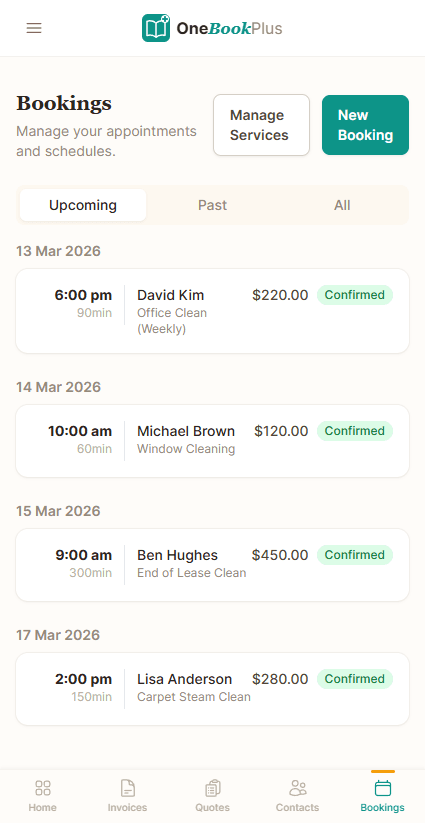
- Online booking page
- Email marketing & campaigns
- Accounting & P&L reports
- Google review requests
- Mobile-first, built in Melbourne
QuickBooks
From Simple Start ($25/mo) — accounting only
- Invoicing (US-centric design)
- Native ABN validation
- Native BAS summaries
- CRM & contacts
- Online bookings
- Email marketing
- Accounting & P&L
- Review management
- US-first, retrofitted for AU
Feature by feature
OneBookPlus vs QuickBooks — detailed comparison
QuickBooks is a solid US accounting tool, but Australian businesses deserve software built for Australian tax law and business practices.
| Feature | OneBookPlus | QuickBooks |
|---|---|---|
| GST-compliant invoicing (Australia) | Yes | Yes |
| ABN validation & lookup | Yes | No |
| BAS / ATO tax summaries | Yes | Yes |
| CRM & contact management | Yes | No |
| Online booking page | Yes | No |
| Job management & pipeline | Yes | No |
| Google Calendar sync | Yes | No |
| Email marketing & campaigns | Yes | No |
| Accounting & P&L reports | Yes | Yes |
| AI for bank reconciliation / categorisation | Yes | Yes |
| Bank feed auto-reconciliation | Yes | Yes |
| Payroll (via Employment Hero) | Yes | Yes |
| Quoting with one-click accept | Yes | Yes |
| POS & retail management | Yes | No |
| Google review requests | Yes | No |
| Native mobile app | Yes | Yes |
| Free plan available | Yes | No |
| Price (AUD) | From $0/mo | Simple Start+ ($25/mo) |
| All included | Accounting only |
Category by category
Cloud accounting vs an all-in-one platform
QuickBooks is a deep accounting ledger. OneBookPlus does the accounting too — then bundles the CRM, bookings, job pipeline, and marketing you’d otherwise buy separately. Each row is cited against QuickBooks’ public Australian pages.
| Category | Feature | OneBookPlus | QuickBooks |
|---|---|---|---|
| Verticals | Vertical-specific dashboards (trades, salon, hospitality, aged care) | 18 verticals | Generic accounting ledger [src] |
| Invoicing | GST-native invoicing | Yes | Yes |
| ABN validation against the Australian Business Register | Yes | Not native (manual entry) [src] | |
| GST / BAS | BAS-ready GST summaries (G1, 1A, 1B) | Yes | Yes |
| STP / Payroll | STP Phase 2 payroll | Built-in | Add-on (Employment Hero) [src] |
| Accounting | P&L, balance sheet, bank reconciliation | Yes | Yes |
| Bank feeds | Australian CDR Open Banking bank feeds | CDR (130+ banks) | Intuit bank feed [src] |
| CRM | Built-in CRM & contact management | Yes | No |
| Bookings | Customer-facing online booking page | Yes | No |
| Jobs | Quote → job → invoice pipeline | Yes | Basic project tracking only [src] |
| Marketing | Email marketing & Google review requests | Yes | No |
| AI features | AI accounting / categorisation | AI Companion | Intuit Intelligence (Accounting / Customer / Tax AI) [src] |
| Multi-currency | Multi-currency accounting | AUD-first; single-currency | Multi-currency on higher tiers [src] |
| Mobile | Native iOS + responsive web | iOS + web | iOS + Android app [src] |
| Build origin | Built for the Australian market | Built in Melbourne | US-first, localised AU edition [src] |
| Annual pricing transparency | Standard price shown without intro-discount confusion | Flat AUD price | 50% off first 3 months promo [src] |
| Starting price (AUD, inc. GST) | From $0/mo | From A$25/mo | |
| All modules included · AUD · no intro-discount cliff | Accounting only · payroll & CRM/bookings/marketing extra |
Where QuickBooks wins
Credit where it’s due
Intuit has been building accounting software since 1983, and that depth is real. QuickBooks Online handles multi-currency, class and location tracking, inventory on its Plus and Advanced tiers, and a genuinely strong AI layer — Intuit Intelligence’s Accounting AI, Customer AI, and Business Tax AI go further on pure-accounting automation than OneBookPlus claims to. Its ProAdvisor bookkeeper network and decades of reporting maturity mean that if you run a complex, multi-currency books-first operation and your accountant is already a QuickBooks specialist, the ledger itself is hard to fault. For a pure accounting tool with a deep app marketplace, QuickBooks is a category leader — we’re not pretending otherwise.
Where OneBookPlus wins
Three differences that compound
One platform, not accounting plus four subscriptions. QuickBooks is the ledger — when you need to manage a contact pipeline, take online bookings, run an email campaign, or chase a Google review, you buy add-ons (CRM, Calendly, Mailchimp). Even payroll is a separate Employment Hero-powered add-on. OneBookPlus ships invoicing, accounting, CRM, bookings, job pipeline, marketing, and STP Phase 2 payroll inside the same subscription — one login, one bill, one customer record.
Australian-first, not a localised US edition. QuickBooks’ Australian edition adds 10% GST and BAS support on top of an Intuit product shaped for North America. OneBookPlus is built in Melbourne: 10% GST is the default, ABN validation runs live against the Australian Business Register, BAS summaries generate automatically, and bank feeds come through Australia’s CDR Open Banking framework rather than screen-scraping — no US-centric date, currency, or tax defaults to fight.
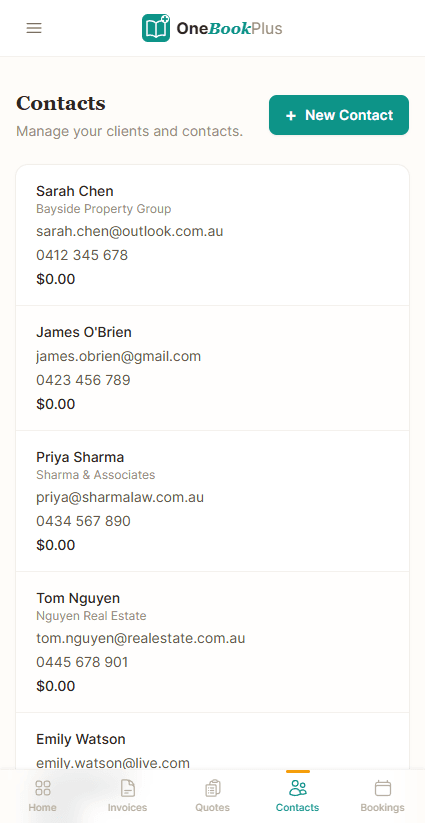
The customer record spans the whole job, not just the ledger. In a QuickBooks-centred stack, the contact who booked through your scheduler, the lead in your CRM, and the invoice in your books are three records in three tools. OneBookPlus uses one contact across booking, quote, job, invoice, payment, and review — so a tradie or salon owner sees the entire relationship in one place instead of reconciling exports between QuickBooks and the apps bolted around it.
Why switch
Why Australian businesses choose OneBookPlus over QuickBooks
Australian-first, not US-retrofitted
QuickBooks was built for American businesses and adapted for Australia. OneBookPlus is designed in Melbourne specifically for Australian tax law, ABN validation, GST calculation, and ATO-compliant BAS reporting. No workarounds needed.
More than just accounting
QuickBooks gives you accounting and invoicing. OneBookPlus gives you that plus CRM, online bookings, email marketing, review management, and a full business dashboard. One subscription replaces five.
Save money every month
QuickBooks charges for accounting, then payroll (Employment Hero) is extra, CRM is extra, bookings are extra, marketing is extra. OneBookPlus includes everything from $0-69/month — saving Australian businesses over $1,000 per year.
Built for sole traders & small teams
QuickBooks can be overwhelming with features designed for larger US businesses. OneBookPlus is purpose-built for Australian sole traders, freelancers, tradies, and small teams who want simplicity without sacrificing power.
FAQ
OneBookPlus vs QuickBooks — your questions answered
Is OneBookPlus better than QuickBooks for Australian businesses?
For Australian small to medium businesses, yes. QuickBooks is designed primarily for the US market. While it has an Australian version with GST and BAS support, many features feel retrofitted — ABN validation isn't native, and the payroll is powered by a third-party (Employment Hero), per QuickBooks' AU payroll page (quickbooks.intuit.com/au/payroll/). QuickBooks does have strong AI features through Intuit Intelligence (Accounting AI, Customer AI, Business Tax AI), documented on quickbooks.intuit.com/au, but OneBookPlus is built from the ground up for Australian tax compliance with automatic GST calculation, ABN lookup via the Australian Business Register, and ATO-ready BAS summaries. Plus, OneBookPlus includes CRM, bookings, job management, and marketing that QuickBooks doesn't offer.
Can OneBookPlus replace QuickBooks for my business?
Yes. OneBookPlus handles everything small to medium businesses use QuickBooks for — invoicing, expense tracking, profit and loss reports, and tax compliance — plus it adds CRM, online bookings, job management, email marketing, POS, and review management. If you're an Australian business using QuickBooks, switching to OneBookPlus means better tax compliance, more features, and lower costs. QuickBooks' advantage is its Intuit AI suite and large integration ecosystem; OneBookPlus's advantage is that everything is built-in from day one.
How much does QuickBooks cost compared to OneBookPlus in 2026?
QuickBooks AU offers Simple Start, Essentials, Plus, and Advanced plans (from ~$25/mo up to ~$95/mo). On top of accounting, payroll is an add-on powered by Employment Hero with Standard and Advanced tiers. You'll still need separate subscriptions for CRM, bookings, and marketing. OneBookPlus starts free with a generous plan, and paid plans at $29-69/month include invoicing, CRM, bookings, email marketing, job management, and full accounting. Most small to medium businesses save significantly by consolidating to OneBookPlus. QuickBooks currently offers 50% off for the first 3 months for new customers.
Does QuickBooks have AI features that OneBookPlus doesn't?
Yes — QuickBooks markets a suite of AI tools through Intuit Intelligence (documented on quickbooks.intuit.com/au): Accounting AI categorises and reconciles transactions, Customer AI identifies leads and drafts follow-ups, and Business Tax AI helps optimise deductions. These are impressive features. OneBookPlus focuses on giving you a complete business platform at an affordable price, with an AI Companion that suggests transaction categorisation as CDR bank feeds land. If AI-powered accounting is your top priority, QuickBooks' Intuit Intelligence is strong. But if you want one Australian-built app that handles CRM, bookings, jobs, marketing, and accounting without paying for separate tools, OneBookPlus is the smarter choice.
What is the best QuickBooks alternative in Australia in 2026?
OneBookPlus is the best QuickBooks alternative for Australian small to medium businesses. Unlike QuickBooks which is a US-centric accounting tool with an Australian bolt-on, OneBookPlus is built in Melbourne specifically for Australian businesses. It includes GST invoicing, ABN validation, BAS summaries, CRM, online bookings, job management, POS, email marketing, and review management — all in one app from $0/month. It's designed for sole traders, tradies, freelancers, and small teams who want Australian-first software.
What is an ABN, and why does native ABN validation matter?
An ABN (Australian Business Number) is the 11-digit identifier the Australian Business Register issues to every registered business, and Australian tax invoices must show it. OneBookPlus validates ABNs natively against the Australian Business Register so the details on your invoices are correct before you send them. QuickBooks was built for the US market, so ABN validation is not native — Australian businesses often enter and check ABNs manually. Native validation reduces invoicing errors and keeps your records ATO-ready from day one.
How it works
How OneBookPlus runs your books and your business
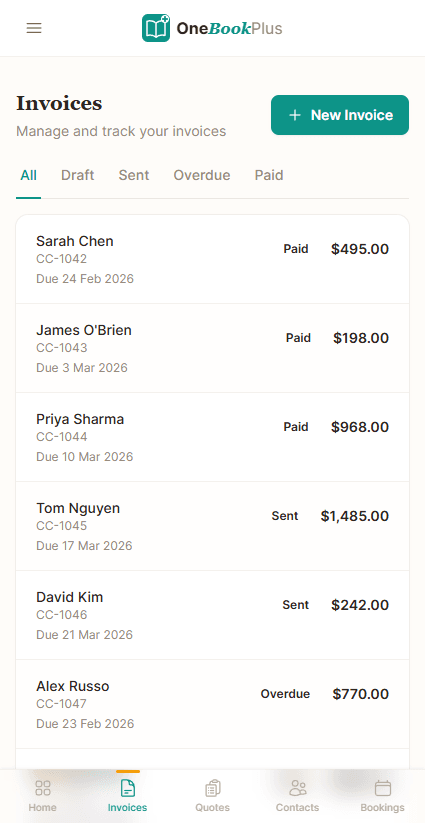
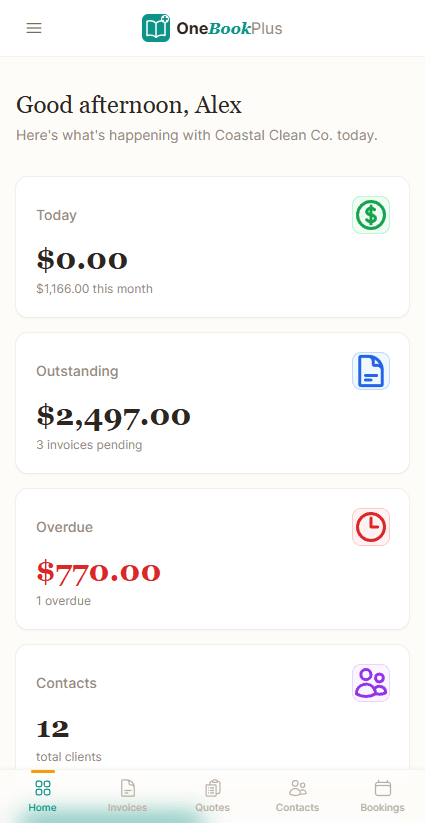
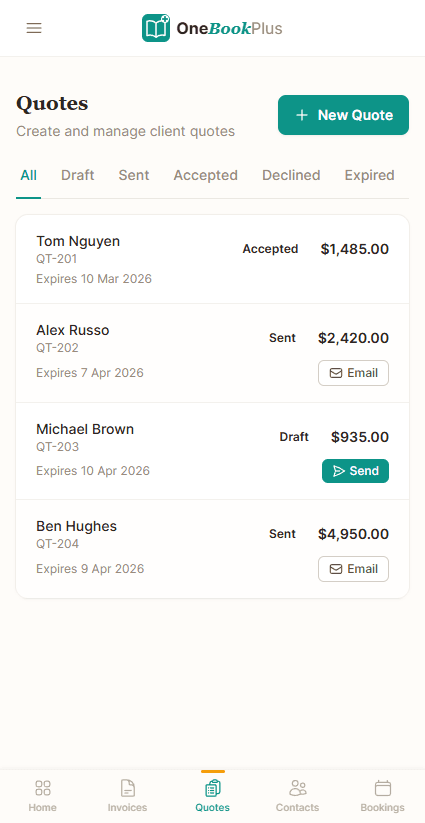
With QuickBooks, your accounting lives in one app and the rest of your business lives elsewhere — a separate CRM for contacts, Calendly for bookings, Mailchimp for email, and an Employment Hero-powered add-on for payroll. OneBookPlus collapses that into a single workflow. When a new customer arrives — through your online booking page, a phone call, or a referral — you create them once as a contact. From that one record you raise a quote, they accept it with one tap, and it becomes a job, then a GST-compliant invoice with your ABN and a 10% GST breakdown applied automatically.
Every dollar then flows straight into the built-in accounting engine. Bank transactions arrive through Australia’s CDR Open Banking feeds — you authenticate with CBA, NAB, ANZ, Westpac, or 130+ other institutions, and the AI Companion suggests categorisation as transactions land. Profit and loss, balance sheet, and GST tracking update in real time. There is no export to QuickBooks, no sync reconciliation between an invoicing tool and a ledger, and no second subscription — the invoice and the journal entry are the same event in the same system.
When BAS time arrives, OneBookPlus produces an ATO-aligned summary showing GST collected on sales (1A), GST credits on purchases (1B), and your net position at G1 — ready to lodge or hand to your accountant. Single Touch Payroll Phase 2 reporting and SuperStream are built in rather than bolted on through a third-party payroll add-on, so wages, super, and tax reporting stay inside the same customer-and-books record.
After the work is done and paid, OneBookPlus keeps earning for you: it can automatically send a Google review request, add the contact to an email marketing list, and schedule seasonal or maintenance follow-ups. QuickBooks is built to record what already happened; OneBookPlus records it and then helps you win the next job — without a fifth tool to pay for and reconcile.
OneBookPlus vs QuickBooks — Built for Australia, Not Adapted
QuickBooks Online is a solid accounting tool globally, but it was built for the American market and adapted for Australia. That shows in small but frustrating ways: date formats default to US, tax calculations aren't always intuitive for GST, and features like payroll are powered by a third-party (Employment Hero) rather than built natively. Support hours don't always align with Australian time zones.
OneBookPlus was built in Australia, for Australia, from day one. GST at 10% is the default, ABN validation is built in, BAS summaries generate automatically, and every date, currency, and tax reference assumes you're operating in Australia. Beyond accounting, you get a full business platform: CRM, job management, online bookings, email marketing, POS, rostering, and bank feeds via CDR Open Banking — none of which QuickBooks offers without add-ons.
Feature Deep Dive
- Australian Open Banking (CDR) — QuickBooks uses its own bank feed system. OneBookPlus connects via Australia's Consumer Data Right framework — the government-mandated open banking standard. You authenticate with your actual bank (CBA, NAB, ANZ, Westpac, and 130+ more), and transactions flow in with AI-powered categorisation. No screen scraping, no credential sharing.
- All-in-One vs Accounting-Only — QuickBooks is accounting software. When you need to manage jobs, book appointments, run email campaigns, or track Google reviews, you're back to buying add-ons. OneBookPlus includes all of these in a single subscription — one login, one bill, one place to find everything.
- Industry-Specific Workflows — QuickBooks treats every business the same. OneBookPlus adapts to your industry: tradies get a job pipeline, salons get booking management, restaurants get POS and kitchen display, aged care providers get recipient management and care notes. The platform reshapes itself around how your business actually operates.
Who Should Switch from QuickBooks
- Australian businesses frustrated by US-centric defaults — if you're constantly adjusting settings to make QuickBooks feel Australian, OneBookPlus is native.
- Small businesses paying for QB + add-ons — if your QuickBooks bill plus scheduling, CRM, and marketing tools exceeds $80/month, OneBookPlus does it all for less.
- Service businesses that need job tracking — QuickBooks has basic project tracking but nothing like a real job pipeline with quotes, scheduling, and photo documentation.
- —When QuickBooks might still fit: If you're part of a global company using QuickBooks across multiple countries, or your US-based accountant requires QuickBooks access specifically, the multi-country support may justify staying.
Getting Started
Sign up free, import your contacts from QuickBooks via CSV export, and connect your bank account through Open Banking in under two minutes. Your QuickBooks history stays intact for tax records. Start creating invoices and managing clients in OneBookPlus today — most businesses are fully switched within a week.
Migration guide
How to switch from QuickBooks to OneBookPlus
Export your customers and chart-of-accounts from QuickBooks
In QuickBooks Online, export your Customers list and your products/services as CSV (Reports → export, or Customers → export). Import the contact list straight into OneBookPlus — names, emails, phone numbers, ABNs, and addresses map across — and your QuickBooks file stays intact as a read-only tax record.
Set your ABN, GST, and connect Open Banking
Enter your ABN (validated live against the Australian Business Register), confirm GST registration and BAS cycle, upload your logo, and connect your bank through CDR Open Banking in under two minutes. From here every invoice is AU-native and your transactions flow in without screen-scraping or credential sharing.
Pick a clean cut-over date, then wind down QuickBooks
Most businesses cut over at the start of a BAS quarter: raise all new invoices, bookings, and payroll in OneBookPlus while QuickBooks stays as the archive for the prior period. Reconcile the final QuickBooks BAS, then cancel the subscription — along with the separate CRM, scheduler, and email tools the QuickBooks stack required.
Ready for software that's actually
built for Australian business?
Join Australian small to medium businesses who switched from QuickBooks to OneBookPlus.
No credit card · Free plan available · Cancel anytime
About this comparison
How we compared OneBookPlus to QuickBooks
Feature claims about OneBookPlus reflect what is shipping today on onebookplus.com.au. QuickBooks pricing and feature claims were last verified against QuickBooks’s public Australian product pages on the date below; vendor pricing changes frequently, so check the QuickBooks website for your specific situation before making a decision.
Disclosure: OneBookPlus publishes this comparison and stands to benefit if you switch. We aim to compare like-for-like on capability and Australian tax compliance — if you spot something out of date, email hello@onebookplus.com.au and we’ll review it.
About the author
Bishal Shrestha
Founder & CEO, OneBookPlus
Bishal has over a decade of experience in digital marketing, web development, and small business consulting across Australia. Bishal regularly assists Australian small to medium businesses with software stack consolidation — including the trade-offs of moving from QuickBooks to an integrated platform. The comparison above is informed by direct migration experience, not a single read of the QuickBooks marketing site.
Last reviewed and updated: May 2026 by Bishal Shrestha