For Restaurants, Cafes & Bars
Restaurant Management Software That Saves You Hours
Know your covers, average spend and labour % before the last table leaves.
Daily sales, table bookings with no-show tracking, menu specials, voids & comps, and BAS-ready GST invoicing — one platform for an Australian restaurant, cafe or bar, no per-terminal lock-in. All-in-one for $0–$69/mo — replaces Square POS + OpenTable + Xero + Deputy.
The average independent venue saves $300+/mo replacing Square POS + OpenTable + Xero + Deputy + Mailchimp with OneBookPlus.
See your savingsFree Tools & Resources
Reference material for owners and operators
Start a Cafe or Restaurant
8-step founder guide — ABN, GST, food licence, fit-out, liquor, insurance, suppliers, opening week.
Open →InteractiveMenu Item Pricing Calculator
Interactive estimator — food cost %, labour, overhead, GP target, and final menu price.
Open →ReferenceFood Safety Supervisor by State
FSS certificate requirements per state, refresher cycles, and when an Allergen Aware course is mandatory.
Open →Operator GuideRestaurant Industry Award (MA000119)
Plain-English MA000119 — Level 1–6 classifications, Saturday/Sunday penalties, casual loading, junior rates.
Open →ReferenceHospitality Insurance Guide
Public liability, food/product liability, liquor liability, business interruption, glass — coverage and premium ranges.
Open →Key takeaways
5- Australian restaurants and cafés must charge 10% GST on most food and beverage sales (dine-in, takeaway, and delivery), but most basic groceries (raw fruit, vegetables, bread, milk, meat) are GST-free at the supermarket level — café sandwiches and prepared meals are taxable.
- Common AU restaurant POS pricing: Square (free hardware, 1.6%–2.2% per tap-and-go), Lightspeed Restaurant (~$69–$229/month per location), Kounta by Lightspeed (~$60+/month). Most don't include accounting — Xero or MYOB ($35–$120/month) is added on top.
Show 3 moreShow less
- OneBookPlus replaces the typical hospitality stack — POS + Xero + a CRM + email marketing — with one platform from $0/month (Free) to $69/month (Growth). Bundled: daily sales tracking, menu management, table bookings, GST-aware invoicing, BAS-ready reporting, email and SMS marketing, Google review automation.
- Online ordering aggregators (Uber Eats, DoorDash, MenuLog) take 25–35% commission per order. Native direct-order pages (included with OneBookPlus, sometimes with Square) keep margins intact at the cost of customer acquisition effort.
- Compliance: the FSANZ Food Standards Code (Chapter 3 — food safety practices, premises, equipment) is enforced by your state Food Act and local council via your Food Business Notification or registration; alcohol service requires a state liquor licence and RSA-certified staff; Standard 3.2.2A also mandates a Food Safety Supervisor (FSS) for food-service businesses in most categories.
Complete Hospitality Toolkit
Built for Restaurants & Cafes
From daily sales to supplier invoices, OneBookPlus gives hospitality owners the tools to understand their numbers and grow their business.
Daily Sales & Revenue Dashboard
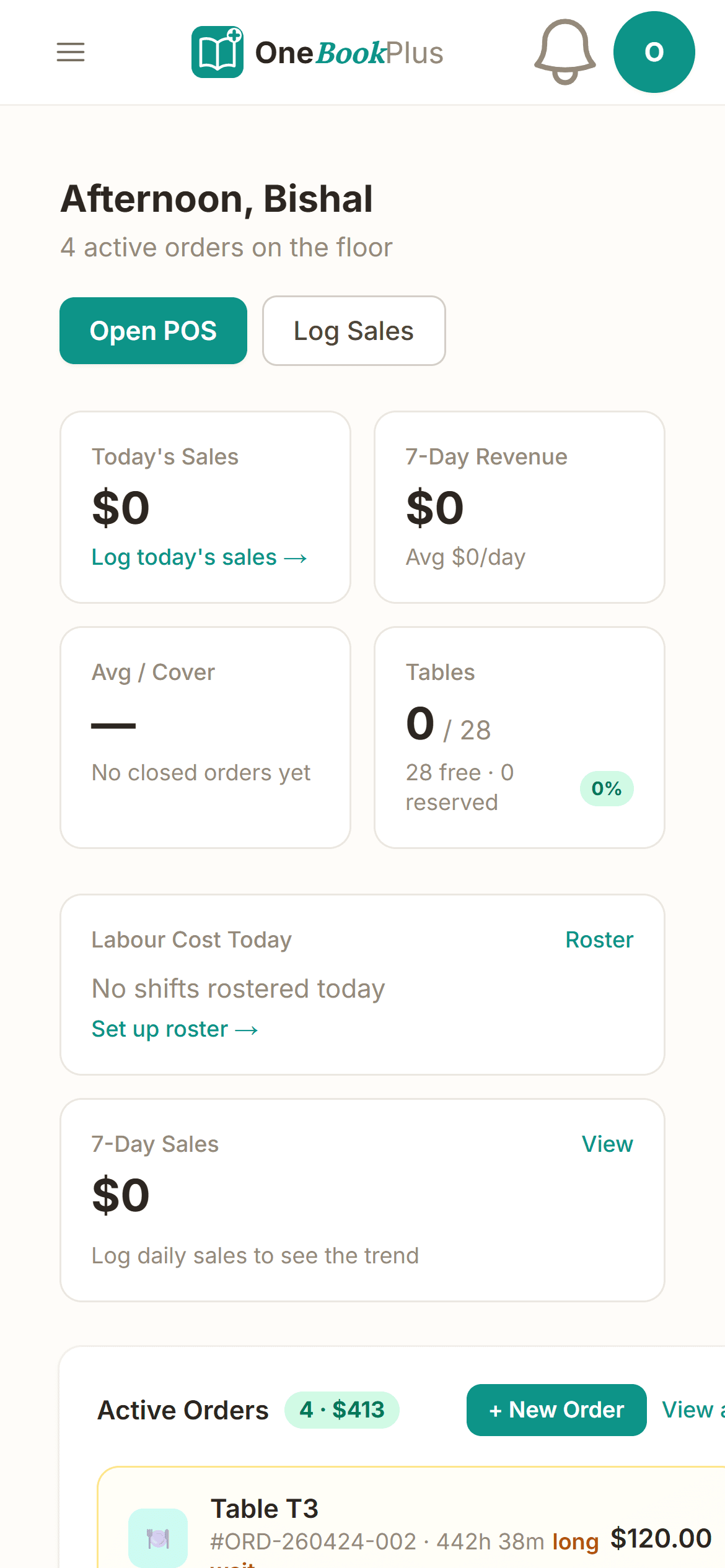
Two minutes after lockup you'll know your covers, average spend, labour %, and how the week tracks against last week. One screen, four numbers that actually matter.
Reservations & No-show Tracking
Tap to seat, tap to mark a no-show, so by Friday you know exactly what your no-show rate is — and whether it's time to start asking for a deposit on Saturday nights.
Table Management & Floor Plan
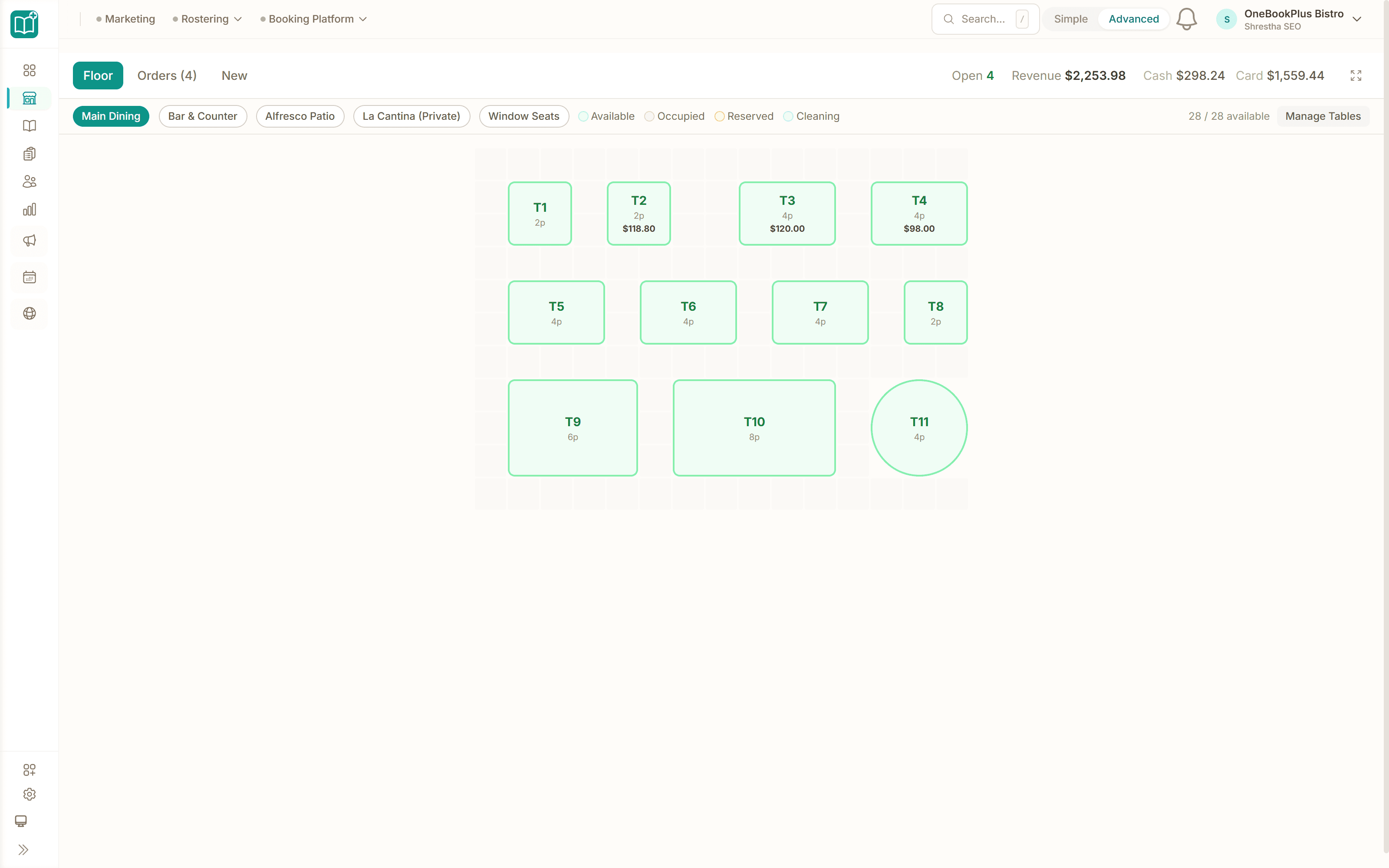
Drag your tables onto the floor plan once. After that, the host sees who's seated, who's booked, and who just walked in — without asking the kitchen or three different servers.
Labour Cost Tracking
Live labour-cost percentage, updated every time the till rings. If you've set a 30% target and the room's quiet at 8pm, the number tells you to send someone home before it gets ugly.
Voids, Comps & Discounts
Every void, comp and discount is logged with who hit the button. No more end-of-month surprises trying to work out where $400 in steaks went.
Invoicing & GST
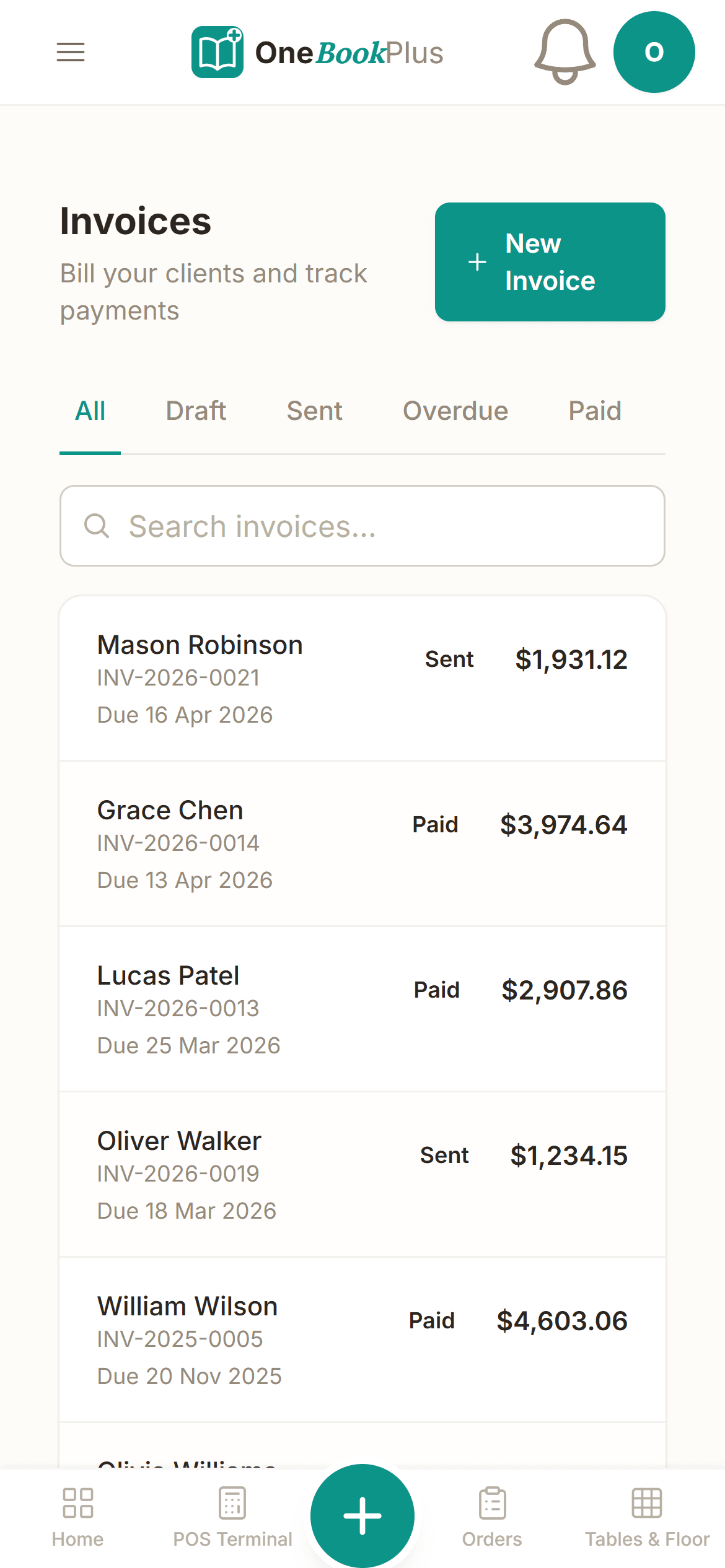
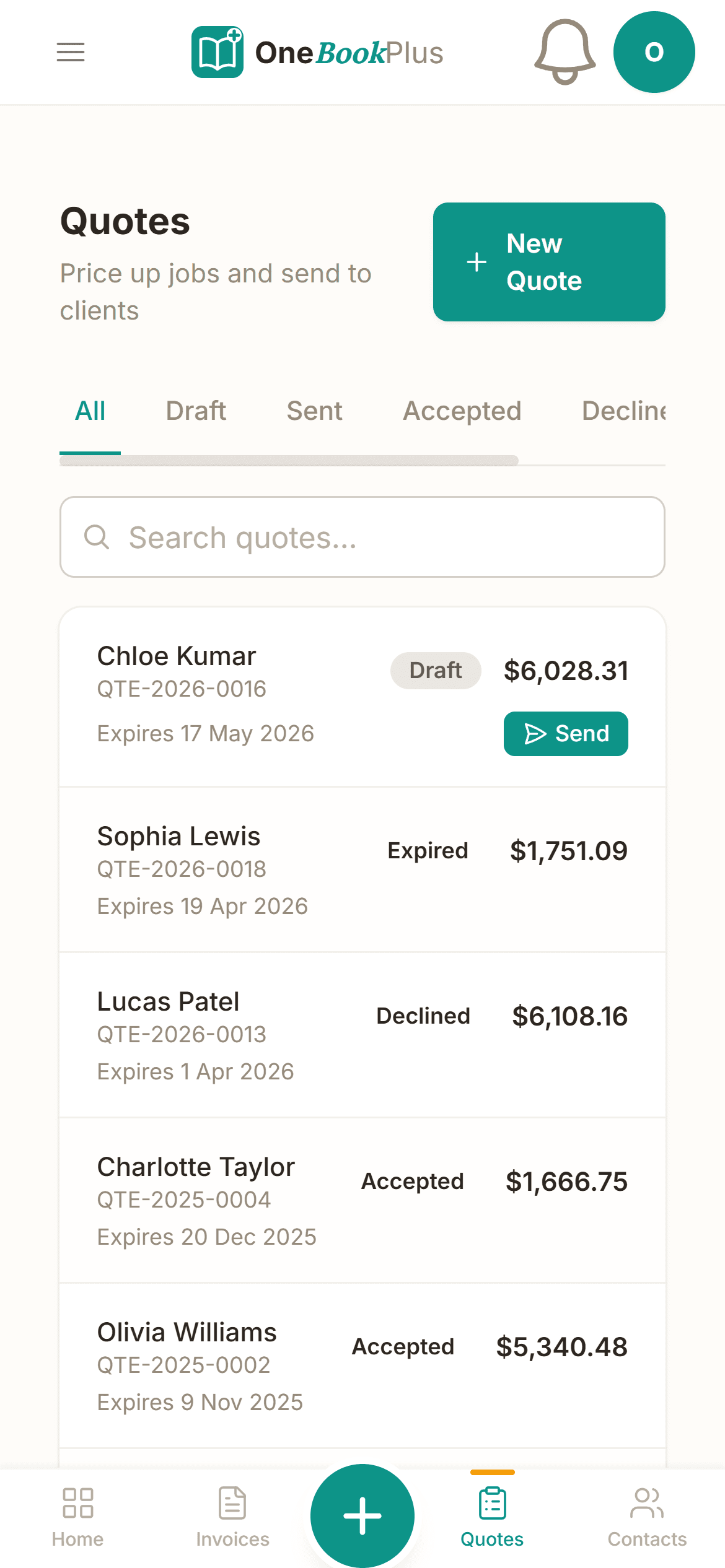
Catering deposit on Tuesday, function balance on Friday — both go out as proper tax invoices with your ABN and 10% GST already on them. Suppliers and event clients in the same place.
Free plan available · No POS lock-in · Cancel anytime
Free Website Included
Your venue business gets a website. Free.
Stop paying $30–80/mo to Wix or Squarespace — and skip the $1,500–3,000 up-front for a designer. Every OneBookPlus venue gets a branded booking page on the free plan. Want it on your own domain like a proper business website? $15/mo and we host it for you.
your-business.onebookplus.com.auoronebookplus.com.au/book/your-businessyourbusiness.com.au— custom branded domain, we host the site24/7 emergency callout booking
Diners book a Saturday table or order pickup at 11pm while the kitchen's closed. The reservation lands on your floor plan with party size and notes — and direct pickup orders skip the 30% Uber Eats commission entirely.
Branded with your colours, logo & licence
Brand color picker in settings. Logo upload. Trade licence number shown on every page so customers know you're legit.
Show service prices upfront
Two-course set menu $59pp. Function deposit from $250. Customers see prices before booking — kills the price-shopping phone calls.
Mobile-first — looks great on phones
70%+ of venue searches happen on phones. Your booking page is built mobile-first; loads in under 2 seconds on 4G.
Bring your own domain — we host the site
Already own yourbusiness.com.au? Add the Booking Website app ($15/mo) and point your domain at the booking page we host for you. We don't sell domains — keep yours wherever you registered it.
Local SEO baked in
Schema.org markup for venue services + suburbs you cover. Google finds you for 'restaurant in [suburb]' searches.
Venues website cost — typical
What venues pay for a website
- $30–50/mo
Website builder
Wix, Squarespace or similar
- $15–40/mo
Web hosting + SSL
Bundled in builders; separate if custom site
- $1,500–3,000
Designer (one-off)
Only if you want a custom-built site
- $12/mo
Bookings on Calendly
Separate from your website
Typical recurring total
~$60–100/mo
+ $1,500–3,000 up-front if you hire a designer
With OneBookPlus
Included on every plan
- Branded booking page — free plan
- Hosting + SSL — free plan
- 24/7 customer self-booking — free plan
- Connect your own domain — +$15/mo (BYO)
Your total
$0–15/mo
See it in action
The screens you'll actually use.
Not mockups — the real product screens for a working Friday-night service.
End-of-service dashboard
Two minutes after lockup: covers, average spend per head, labour % against your 30% target, and tonight vs last Friday. The four numbers Square's reporting buries three menus deep.
Reservations & no-show tracking
Tap to seat, tap to mark a no-show. By Saturday you know your no-show rate is 1-in-8 — the evidence you need to start taking a $25-a-head deposit on weekend bookings without OpenTable's $249/mo bill.
GST-ready function invoice
Catering deposit Tuesday, function balance Friday — both as proper tax invoices with your ABN and 10% GST already on them, ready for the BAS export your bookkeeper actually wants.
Simple Daily Routine
How Restaurant Management Works
Replace the spreadsheets and paper with a simple system that takes minutes a day.
Set up your venue
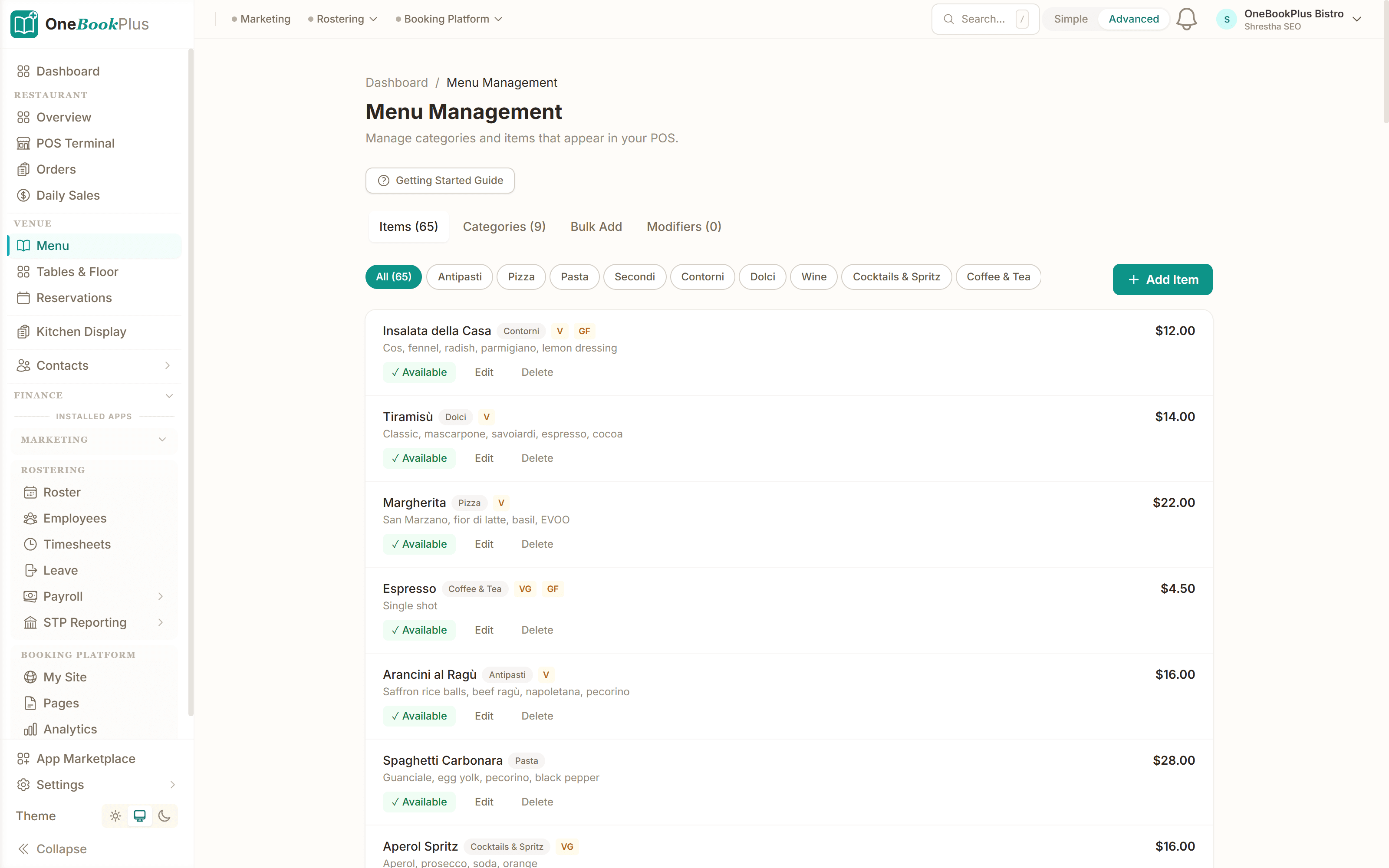
Menu categories, items with dietary tags, a drag-and-drop floor plan, and every staff member — all in one setup. Ready for service in an afternoon.
Take orders on the POS
Servers tap through the menu on any device. Orders flow to the kitchen instantly and settle against the right table, with split bills and tips handled.
Keep the kitchen in sync
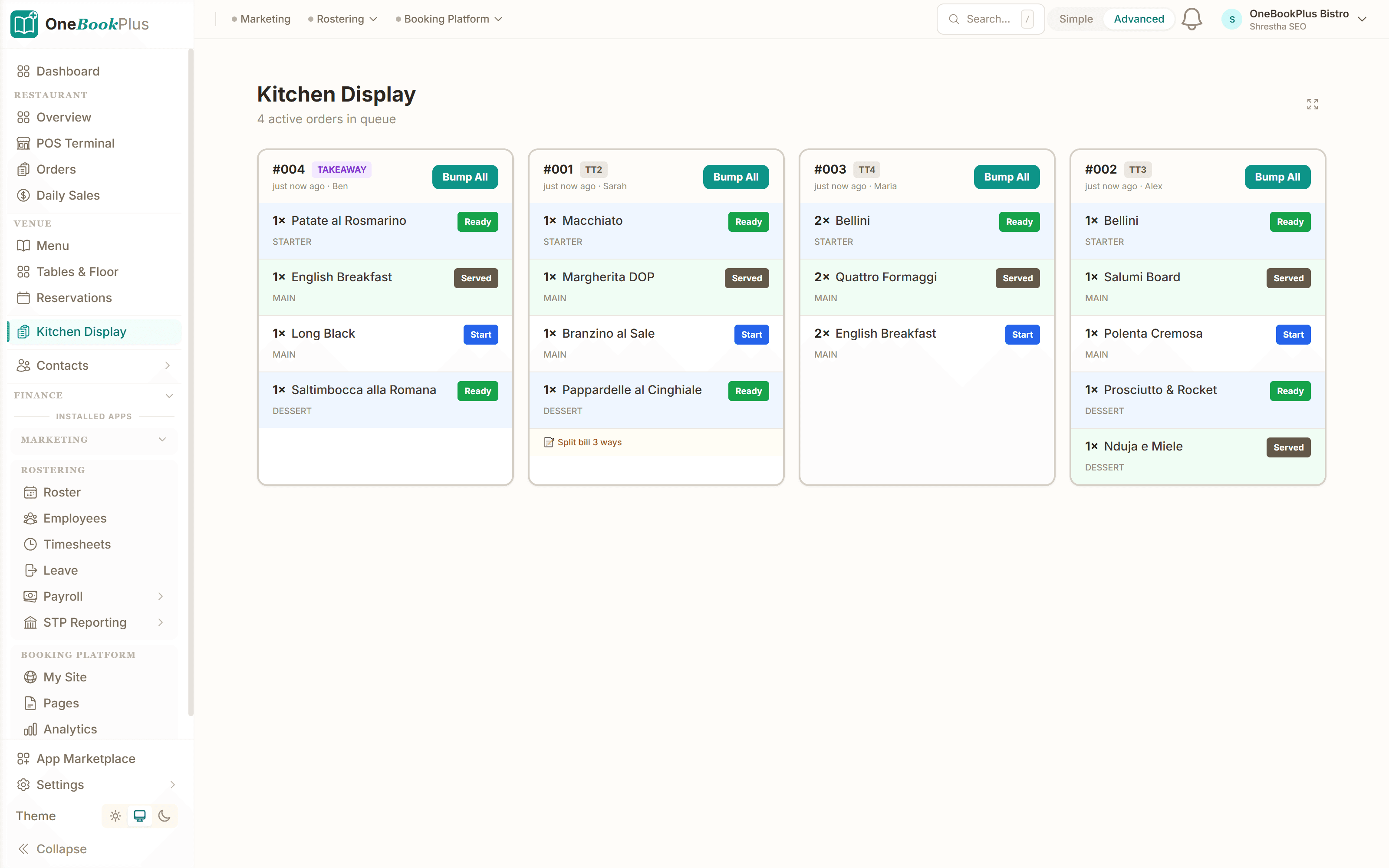
Real-time kitchen display with queued → preparing → ready → served states. No lost dockets. Every ticket timed.
Fill your seats
Reservations plug into the floor plan. Every booking with party size, time, notes and table assignment — no more paper diary, no more double-booked tables.
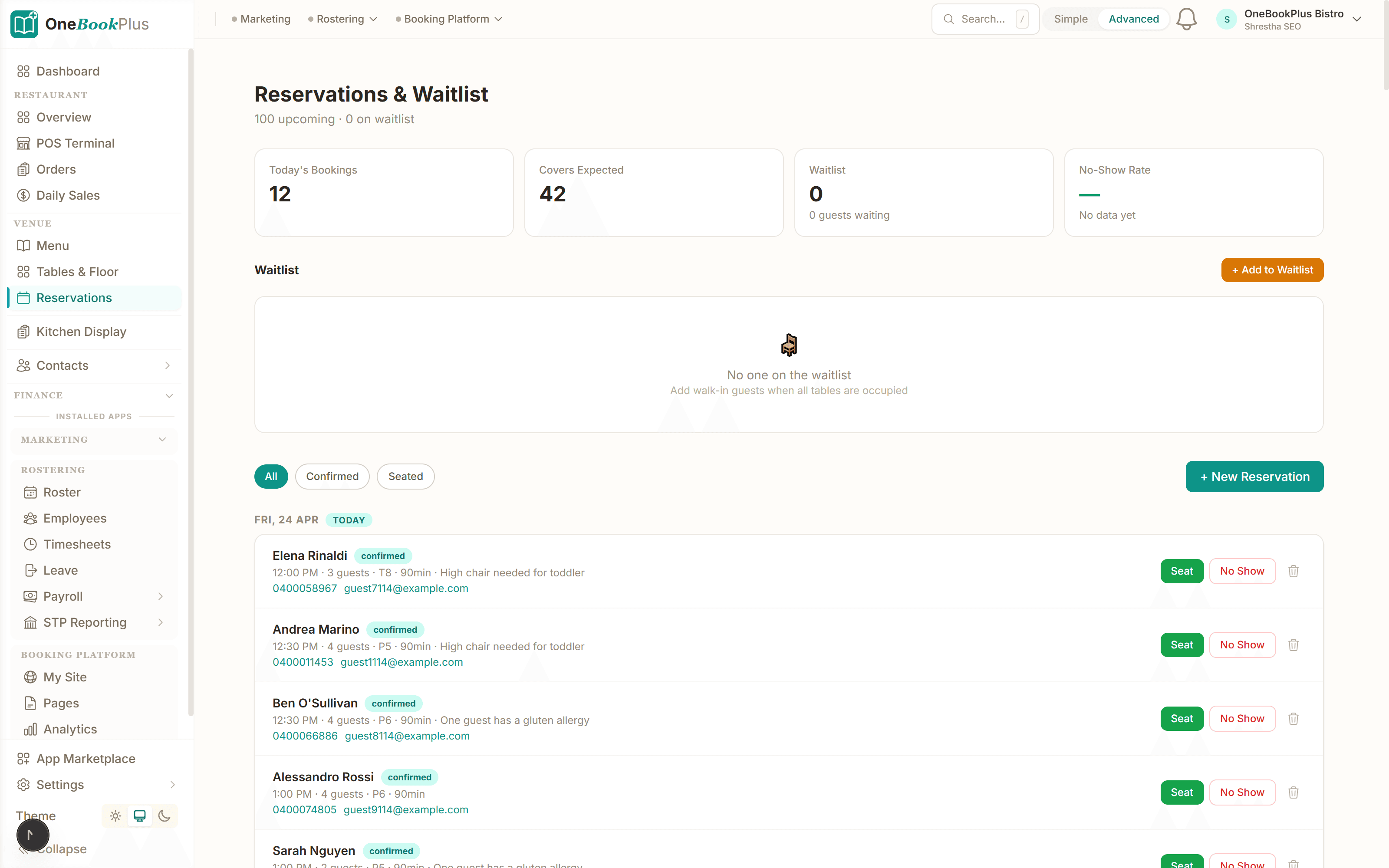
Most venues log their first night's sales within an afternoon of signup
Trusted by Hospitality Businesses Across Australia
100%
GST & ATO compliant for hospitality
$0
Free plan to get started — no POS lock-in
2 min
Daily sales entry at end of service
Real-time
Profit margin tracking across all costs
Restaurant savings calculator
What does your restaurant tech stack really cost?
Adjust the numbers below to match your real monthly spend. The total updates live — and so does what you'd save by replacing the lot with OneBookPlus.
POS subscription (Square, Lightspeed, Kounta)
Monthly per-terminal fee
Accounting (Xero, MYOB)
Monthly subscription
Reservations (OpenTable, Now Book It)
Monthly platform fee
Email marketing (Mailchimp)
Monthly campaigns + list size
Avg covers per day
Used to size the time-saved bonus
Your current tool stack
$147/mo
= $1,764/year
With OneBookPlus Starter
$29/mo
Replaces everything in the list. One bill.
~8 hrs/month of end-of-day admin valued at $35/h. Daily sales auto-reconcile against your bank feed.
Free plan available · No card required · Cancel anytime
One day, written by itself — a day of an Australian restaurant run on OneBookPlus
Scroll through the day from morning to 5pm: the AI receptionist answers and books a missed call, the work runs from the app, the GST invoice is sent on the spot, payment lands and the books balance themselves, a five-star review is requested automatically, and the day closes with the ledger already written.
10:00am
While you're prepping for lunch
A call you'd have missed.
A regular wants the back room on Saturday for her dad's 70th — 18 guests. She calls while you're elbow-deep in mise en place.
AI Receptionist
Answered. Booked. Confirmed.
The AI answers in two rings, holds the back room for Saturday 7pm and texts her the set-menu options.
Mid lunch service
The function sheet writes itself.
Between dockets you glance at the function card: 18 covers, two dietaries, set menu B. The kitchen prep list is drafted.
From the pass
Deposit invoiced before close.
One tap sends the function deposit invoice with a pay link. No laptop in the office after midnight.
Between lunch and dinner
Paid. Booked. Balanced.
The $880 deposit lands by card, the books update themselves and $80.00 GST is set aside for BAS.
Reputation on autopilot
Five stars, asked at the right moment.
Last night's table of six gets a review request at the right hour. Best gnocchi in Melbourne — five stars.
Dinner service loads itself
Your books, already written.
Doors open in an hour. The function's booked and the books balance. The book did the rest.
$0
collected
0
admin tasks done by AI
0
evenings lost
Hospitality pricing
Three plans. All built for venues.
Start free, upgrade when the covers justify it. No contracts, no setup fees, no per-terminal tax, no 1.6–2.2% tap-and-go markup on your own data. Cancel any time.
Free
$0/forever
Log your first night's takings today — no credit card, no POS lock-in.
- 10 invoices/month
- Daily sales + GST tracking
- Menu builder with dietary tags
- Reservations & no-show tracking
- Branded online booking page
- Mobile PWA (works on the pass)
Starter
$29/mo
Replaces OpenTable + Xero + your booking and reminder tools.
- Everything in Free
- Unlimited invoices, covers & tables
- Table floor plan + walk-in seating
- Voids, comps & discount logging
- Live labour-cost % tracking
- Stripe deposits + function balances
- Accounting, P&L & BAS reports
- 5 team members
No card · Drops to Free if you don't upgrade
Growth
$69/mo
For groups chasing reviews, repeat bookings and direct orders.
- Everything in Starter
- Direct online ordering (skip Uber Eats 30%)
- Reputation Engine (auto Google reviews)
- SMS & email marketing to your diner list
- Google & Facebook Ads management
- AI bank transaction categorisation
- Multi-location daily sales rollup
- 15 team members
Prices in AUD inc. GST. Stripe processing fees apply to card payments (1.7% + 30¢ AU cards) — no per-cover or per-terminal fee. Full plan comparison →
Already on another tool?
Switching from Square POS, Lightspeed, Kounta or OpenTable?
Most venues move across between a Sunday close and Monday prep. Export your menu items, supplier contacts and diner list as CSV from your current tool, import them into OneBookPlus with the bulk importer, and you're live before the first booking lands tomorrow.
- 1Export menu, suppliers + diner CSV from Square or Lightspeed (5 min)
- 2Upload via the bulk importer — items, prices and GST flags auto-map (10 min)
- 3Drag your tables onto the floor plan and set your labour-% target (15 min)
- 4Cancel OpenTable and your accounting add-on tomorrow morning — coffee in hand
Switch from
Built-in AI
Can’t get to the phone? Your AI can.
You're slammed on the floor — the phone keeps ringing with bookings and enquiries you never get to.
OneBookPlus
AI Receptionist · incoming call
“Table for six this Friday night?”
If you don't answer, the AI books it — Dinner · Fri 7:30pm · 6 guests — and texts a confirmation.
Australian Owned
Built in Melbourne, AU
GST Compliant
ATO-ready from day one
Bank-Grade Security
256-bit encryption
Free Plan Available
No credit card needed
Frequently Asked Questions
Common questions about restaurant and cafe management software.
What is the best restaurant management software in Australia?
The right fit depends on your venue, but for an independent Australian restaurant the strongest setups pair daily sales tracking, reservations, GST-aware invoicing and BAS-ready reporting in one place rather than stitching a POS to a separate accounting tool. OneBookPlus does exactly that from $0/month — daily takings, covers, average spend, labour-%, table bookings with no-show tracking, and a clean GST summary for your accountant at BAS time, with no per-terminal or per-cover software fee.
How is OneBookPlus different from Square for restaurants?
Square is excellent at the card terminal and tap-and-go (1.6%–2.2% per transaction on AU cards), but its reporting buries the four numbers that decide whether a service made money — covers, average spend, labour-% and tonight vs last week — and it does not do your accounting, so most Square venues still pay for Xero or MYOB on top. OneBookPlus surfaces those numbers on the end-of-service dashboard and includes GST-aware invoicing and BAS-ready reporting in the same product. Many venues keep Square for the card reader and run OneBookPlus alongside it via the daily-takings parser rather than replacing the terminal.
Is OneBookPlus a POS system for restaurants?
OneBookPlus is not a traditional POS terminal — it's a business management platform that works alongside your existing POS or cash register. Use it to track daily sales totals, manage expenses, handle invoicing, and monitor profit margins.
How does daily sales tracking work for restaurants?
At the end of each service or trading day, log your total sales by payment type (cash, card, online). OneBookPlus calculates daily totals, GST collected, and compares against previous periods and targets.
Can I track food costs and supplier invoices?
Yes. Record supplier invoices, categorise expenses (food, beverage, packaging, rent, utilities), and see your cost-of-goods percentages in real-time. This helps you maintain healthy margins.
Does the restaurant management software handle GST?
Absolutely. All invoices include automatic 10% GST calculations, your ABN, and meet ATO requirements. Export GST summaries at BAS time for your accountant.
Can I manage table bookings and reservations?
Yes. Set up your floor plan with table numbers and capacity, accept reservations through your online booking page, and manage walk-ins — all from one dashboard.
Is it suitable for cafes, bars, and food trucks?
OneBookPlus works for any hospitality business — restaurants, cafes, bars, food trucks, catering companies, and bakeries. The daily sales, expense, and menu management features adapt to any food and beverage operation.
About the author
Bishal Shrestha
Founder & CEO, OneBookPlus
Bishal has over a decade of experience in digital marketing, web development, and small business consulting across Australia. He has worked directly with restaurant and hospitality businesses across Melbourne, understanding the unique challenges of daily sales tracking, menu management, and venue operations.
How OneBookPlus Works for Restaurants
Most restaurant owners are running three or four disconnected systems — a POS terminal like Square or Lightspeed for orders, a separate rostering tool like Deputy for staff schedules, Xero or MYOB for accounting, and maybe OpenTable or a paper diary for reservations. The result is a mess of logins, duplicate data entry, and no clear picture of whether tonight's service actually made money after labour and food costs. OneBookPlus brings daily sales tracking, table management, expense monitoring, rostering, and GST-compliant invoicing into one platform designed for Australian hospitality venues — restaurants, cafes, bars, and food trucks.
The platform works alongside your existing POS or as a standalone system. At the end of each service, log your daily sales by payment type — cash, card, and online delivery platforms like UberEats or DoorDash. OneBookPlus calculates your daily totals, breaks down GST collected, and compares against previous periods and targets automatically. Reservations flow in through your online booking page and appear on your table management dashboard, where you can seat walk-ins, mark no-shows, and track covers. Front-of-house staff see the floor plan at a glance — which tables are occupied, reserved, or available.
Your Daily Workflow
Picture a Friday night service. You open the dashboard at 3pm — eight reservations booked, two from last night's waitlist confirmed with a tap. Before service, you update tonight's specials in the menu manager. During service, dine-in orders flow through and covers are tracked as guests are seated, giving you an accurate average spend per head rather than a figure distorted by split bills. Your rostered staff shifts are calculated against tonight's revenue in real time, so you know before service ends whether labour cost is within your 30% target. At close, you log daily sales — cash, card, and UberEats — in under two minutes. The dashboard shows $5,200 in revenue, 52 covers, $72 average per head, and two voided orders to follow up on Monday.
Bank Feeds & Accounting
Connect your business bank account and OneBookPlus reconciles daily sales against bank deposits automatically. Supplier invoices for produce, beverages, and packaging are logged and categorised so you can see your cost-of-goods percentage in real time. Rent, utilities, insurance, and other overheads are tracked separately. GST is calculated on every invoice and expense. At BAS time, export a clean GST summary — GST collected on sales, GST paid on purchases, and the net amount owing — without touching a spreadsheet. Your accountant gets a clear, reconciled set of figures instead of a folder of till receipts.
Getting Started
Sign up for free — no credit card, no POS lock-in. Add your venue details, menu items, table layout, and staff. Configure your daily sales categories (dine-in, takeaway, delivery, catering) and connect your bank account for automatic reconciliation. Most restaurant owners complete setup in under fifteen minutes and start logging daily sales the same evening. The free plan covers core features for a single venue. Upgrade when you need multi-location support, advanced rostering, or detailed food-cost reporting — still far less than the combined cost of Square, Deputy, and Xero.
Know Your Numbers. Grow Your Restaurant.
Stop guessing and start tracking. Daily sales, expenses, and profit margins — all in one place. Free to get started.
Get Started FreeLast reviewed and updated: by Bishal Shrestha
Authoritative sources
Where the food-safety, tax and licensing facts on this page come from
Australian hospitality venues operate under the FSANZ Food Standards Code, state Food Acts and liquor licensing schemes, the Hospitality Industry (General) Award, and ATO GST rules for food. We cite the primary bodies for the claims on this page so you can verify directly.
- FSANZ — Food Standards Code, Chapter 3 (food safety) ↗ — Standards 3.2.2, 3.2.2A (Food Safety Supervisor) and 3.2.3 for food-service premises.
- NSW Food Authority — Food Business Notification ↗ — Registering a food business under the NSW Food Act 2003 with your local council.
- Liquor & Gaming NSW — Responsible Service of Alcohol (RSA) ↗ — Mandatory RSA certification for staff serving alcohol on a licensed premises.
- ATO — GST and food ↗ — Which food and beverage sales are taxable (dine-in, takeaway) vs GST-free.
- Hospitality Industry (General) Award 2020 (MA000009) ↗ — Modern award covering pay rates, penalties and rostering for venue staff.
- Restaurant & Catering Australia (R&CA) ↗ — Peak body for the Australian restaurant, café and catering sector.
Free for cafes & single venues
60-sec sign-up · No card · GST & BAS ready